OVERHEAD SHOWER OPERATING INSTRUCTIONS
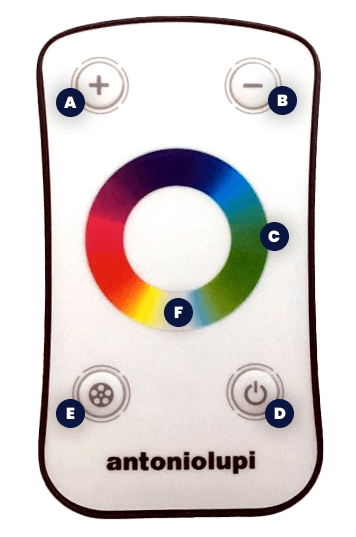
Remote control is touching button.
-
Touch the button D ON/OFF, you can switch on/off the RGB strip. The system will activate in the selected mode before the last power off.
-
By pressing the button E, you can choose 11 different settings between static or dynamic colors. Each time you press, you advance to the next mode as described below:
STATIC MODE (fixed color)
Mode 1 - RED
Mode 2 - GREEN
Mode 3 - BLUE
Mode 4 - YELLOW
Mode 5 - VIOLET
Mode 6 - CYAN
Mode 7 - WHITE
DYNAMIC MODE – HARD TRANSITION (change color)
Mod 8 RED > GREEN > BLUE
Mod 9 RED > GREEN > BLUE > YELLOW > VIOLET > CYAN > WHITE
DYNAMIC MODE – SOFT TRANSITION (change color)
Mod 10 RED > GREEN > BLUE
Mod 11 RED > VIOLET > BLUE > CYAN > GREEN > YELLOW > WHITE
- By pressing the A or B buttons during the static mode, you can adjust the luminous intensity of the selected color by increasing or decreasing it.
- By pressing the A or B buttons during the dynamic mode, it is possible to accelerate or slow down the speed of transition from one color to another.
- By touching with one finger on the color ring C during any of the modes, the system will select the fixed color corresponding to the area touched which will remain set up until a new command.
- By touching the color ring in area F, the white color from RGB can be general.
- By pressing the D ON/OFF button, the system switches off in any mode.
- The remote control after 30 seconds of inactivity automatically enters in stand-by mode, to reactivate it press any of the A, B, E buttons and choose the desired function.
- By pressing the D button, even with the remote control in stand-by, the system switches off.